How to Match a Replacement Battery to Your UPS
Voltage and amp-hours are the two numbers everyone compares, and the two that hide the most differences. Pack arrangement, terminal size, polarity and harness decide whether the unit will run.
Disclosure: We may earn a commission if you purchase through links on this page, at no additional cost to you.
A UPS battery that fits inside the case can still be the wrong replacement. Voltage, capacity, connector, polarity, dimensions, wiring, and the UPS maker's approved cartridge all matter. Start with the UPS model number and its manual or official battery selector. Use the battery label as a cross-check, not as the only buying specification. This guide is for replacing an internal battery in an existing UPS; it does not help select or replace the UPS itself.
That distinction prevents the common mistake of ordering a generic "12 V UPS battery" for a unit whose battery pack contains two cells, a temperature sensor, a special harness, or a manufacturer-specific cartridge. A correct match restores the intended electrical arrangement and makes installation, warranty, and recycling easier to manage.
Start with the UPS model, not the old battery
Find the complete UPS model number on the equipment label. It may be on the rear, underside, behind a front cover, or in a slide-out display menu. Record the full suffix, input voltage region, serial number, and approximate purchase date. Similar model names can have different battery packs across generations or regional versions.
Use the manufacturer's battery selector or the replacement part listed in the user manual. Schneider Electric's APC selector asks users to identify the UPS model from its product label; it specifically cautions against using the old battery or cartridge number as the starting point. APC's support guidance likewise directs customers to the UPS Batteries and Upgrades Selector using the UPS model number. CyberPower offers its own replacement tool by UPS model or serial number. These tools exist because the same-looking battery can serve different UPS models, and the same UPS brand may use multiple cartridge designs.
Write down the exact cartridge part number, not just a generic description such as "12 V, 9 Ah." If the UPS manual names a cartridge, compare the listing against that part number. If the official selector and an online seller disagree, pause and ask the UPS maker or supplier to confirm compatibility in writing. Do not choose the replacement by matching a photograph.
Read the battery label as a cross-check
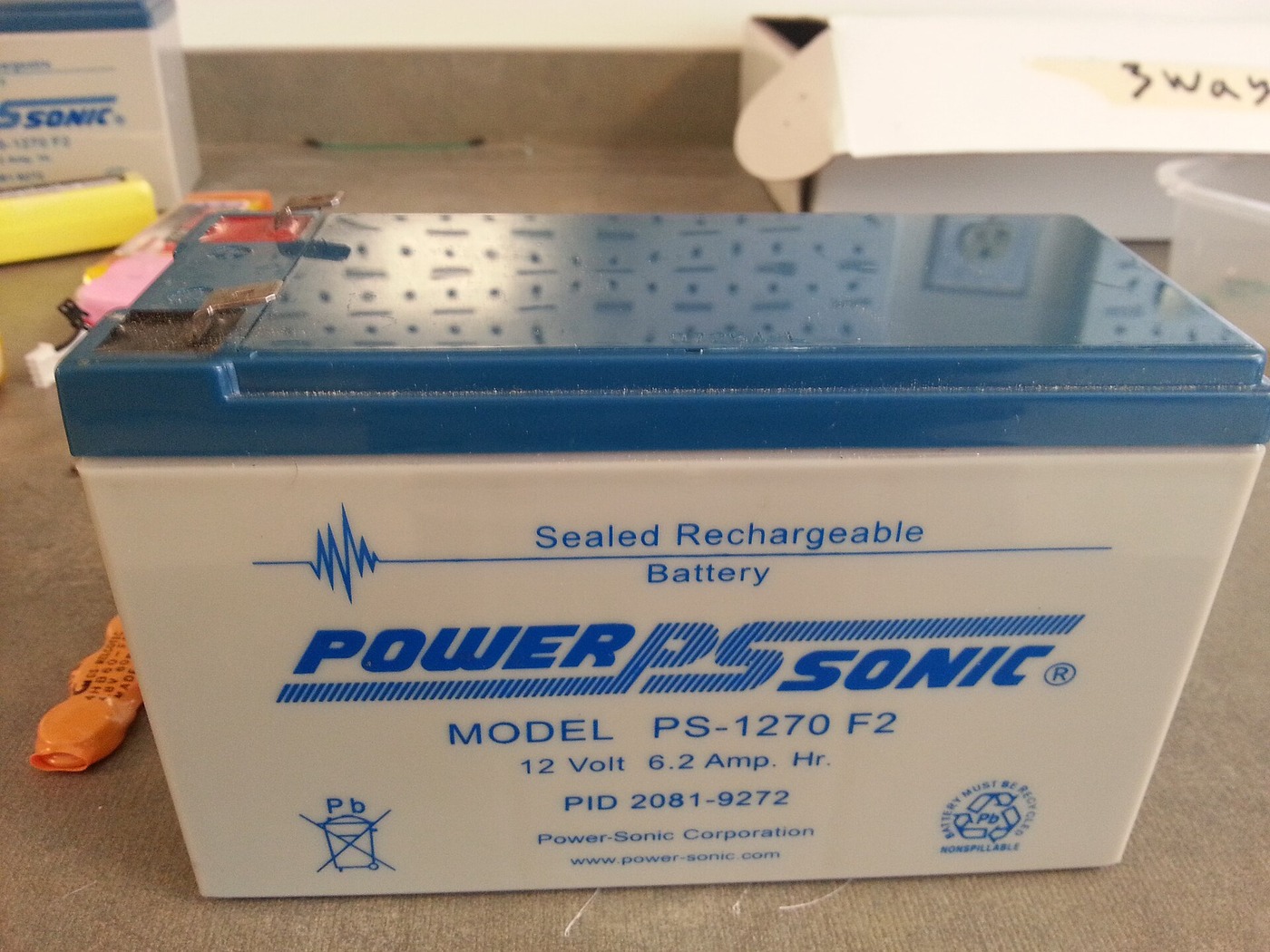
After the UPS model has identified a replacement candidate, inspect the old battery label and record each battery's nominal voltage, amp-hour rating, chemistry, model code, and quantity. Check the UPS manual for the total battery voltage and pack arrangement. A common design uses several 12 V blocks connected in series, but that is not universal. A label on one block does not describe the whole pack.
Compare the replacement candidate against the manufacturer's specification for:
- Chemistry and construction. Many consumer and small office UPS units use sealed valve-regulated lead-acid (VRLA) batteries, often AGM. Other UPS models use lithium-ion packs or proprietary modules. Replace like for like unless the manufacturer explicitly approves another chemistry. A lithium battery with a similar voltage is not automatically compatible with a lead-acid charger, protection circuit, or enclosure.
- Voltage and pack configuration. Match the nominal voltage for each block and the total series or parallel arrangement. Never infer the system voltage from the UPS's AC output rating or from one battery alone.
- Capacity. Match the specified Ah rating or use a higher capacity only when the UPS maker approves it. More Ah is not a universal runtime upgrade: charger settings, pack dimensions, thermal design, firmware estimates, and discharge behaviour may be designed around a particular battery.
- Physical dimensions. Measure length, width, and height, including any case lip or terminal clearance. A battery that presses against the lid, blocks a vent, or strains the harness is not a fit.
- Terminals and polarity. Confirm terminal style and size, connector orientation, positive and negative polarity, and any keyed plug. "Faston" or "tab" alone may not identify the exact terminal size. Never force a connector or adapt wires by twisting, taping, or leaving exposed metal.
- Harness and cartridge. Some units use a single battery; others use a pre-wired cartridge, a tray with multiple blocks, temperature sensing, or a keyed plug. The correct pack can include wiring that a bare replacement battery does not.
Eaton's replacement-cartridge manual recommends checking voltage, capacity, dimensions, and battery quantity when selecting a replacement. It also notes that manufacturers can change battery contents without changing the cartridge model number, and recommends replacing all batteries in a multi-battery system together. Treat the exact UPS manual and cartridge list as controlling where these general checks differ.
Why voltage and Ah alone do not establish compatibility
Two batteries can both be marked 12 V and 9 Ah yet differ in length, terminal tabs, polarity layout, discharge capability, internal resistance, and intended charging profile. Even if each block appears identical, the UPS may require a specific number of blocks wired in a particular configuration. A generic battery product page that says "for UPS" describes an application category; it does not prove that the battery fits your exact model.
Do not substitute a battery merely because a seller lists a longer "life" or higher capacity. UPS runtime depends on the battery pack, load, discharge rate, battery age, temperature, and the UPS's own condition. A new pack does not guarantee a particular number of minutes. If runtime is the reason for replacing the battery, first check the connected load and the manufacturer's runtime chart for the exact UPS model. A replacement pack cannot correct an overloaded UPS, failed charger, or defective inverter.
For multi-battery packs, avoid mixing new and old blocks, different capacities, or different chemistries unless the manufacturer explicitly specifies that arrangement. Mismatched blocks can charge and discharge unevenly. In a pack that uses several batteries, verify whether the cartridge is sold as a complete matched set or whether the manual permits individual block replacement.
Verify the replacement before you order
A short supplier check can resolve gaps that product titles conceal. Send the seller the UPS's full model and region, the official cartridge part number, and clear photos of the battery label and connector. Ask for a written response to these questions:
- Is this exact product compatible with my complete UPS model and revision, not merely with "12 V UPS systems"?
- Is it the complete cartridge or bare battery blocks? How many blocks are included, and is the wiring harness included?
- What are the battery chemistry, nominal voltage, Ah rating, dimensions, terminal size, polarity, and connector part number?
- Is the pack new, and when was it manufactured? What warranty applies, and who handles a failed or damaged unit?
- Can the supplier provide a datasheet and photographs of the exact shipped variant, including label and terminals?
- What shipping, import, and recycling arrangements apply to this battery type and destination?
Compare the seller's answer with the UPS manual and official replacement selector. Save the model label photo, the manual page, the seller's written confirmation, and the order variant. If the supplier cannot confirm the exact model, cartridge, or configuration, do not treat the listing's broad "UPS compatible" wording as proof.
Choose between a cartridge and bare battery blocks
A cartridge is an assembly intended for a particular UPS family. Depending on the model, it may contain one or more battery blocks, a tray, wire harness, fuse, temperature sensor, or keyed connector. Bare blocks are only individual batteries; the installer may have to reuse the old harness if the manual permits it. These purchase forms are not interchangeable by default. Before comparing offers, identify which form the UPS manual calls for and what is included in the listed package. A product photo showing two batteries does not prove that both are included in the price or that the wiring matches your UPS.
If buying bare blocks, compare the count and each block's specifications with the manual, then confirm whether reuse of the original harness is allowed. Inspect the harness only as the manufacturer instructs; a brittle, heat-damaged, loose, or corroded connection should be referred for service rather than improvised. If buying a cartridge, request a photo of the actual connector and label, plus the cartridge part number. This small distinction matters especially when a listing title says "replacement battery" but its package field describes one battery, while the UPS requires a complete multi-block cartridge.
Replace the battery only by the UPS manual
Follow the manual for the exact UPS model. Battery replacement may be user-serviceable on one model and require trained service on another. Some cartridges are designed to slide out while the UPS remains connected to AC; that does not mean every UPS can be opened safely while energised. A unit can contain hazardous voltage even when unplugged, and battery terminals can deliver high short-circuit current.
Before handling the pack, save work on connected equipment, review the manual's warnings, and use only the access and isolation procedure it specifies. Do not open the UPS power-electronics compartment, probe internal circuits, bridge connectors, or work on swollen, leaking, hot, or damaged batteries. Stop and contact qualified service if the pack is damaged or the manual does not clearly authorise user replacement. Keep metal tools and jewellery away from exposed terminals, and prevent the positive and negative terminals from touching.
Install the complete approved cartridge or the precise battery configuration specified by the manufacturer. Check that plugs are fully seated and keyed correctly, wires are not pinched, and the enclosure closes without force. If the manual requires powering down or disconnecting loads, do so; do not assume another model's hot-swap procedure applies to yours.
After replacement, follow the manufacturer's initial charging and self-test instructions. Confirm that the battery alarm clears, the UPS reports a healthy battery, and a controlled self-test passes. Record the date and cartridge number. A successful self-test confirms basic operation; it does not prove the UPS will carry the intended load for a specific duration. Use the exact model's runtime table or a properly controlled test for that decision.
Recycle the old battery and retain the evidence
Do not put a lead-acid UPS battery in household rubbish or a municipal recycling bin. The U.S. Environmental Protection Agency advises returning lead-acid batteries to a battery retailer or local household hazardous-waste programme. Other countries may use different collection systems, so check local rules and the battery maker's return programme. Keep damaged batteries separate and follow the receiving facility's handling instructions.
Keep the old label photo and the new cartridge documentation with the UPS's maintenance record. This makes the next replacement easier and helps a technician identify the installed pack without guessing. Store the supplier's datasheet and order variant as well; "same voltage" is not enough information for future purchasing.
Equipvia may earn a commission from qualifying purchases through this link. The link resolved to Product ID 1601386822658 during review. CPS resolution does not verify the seller's technical claims, the battery's fit in any UPS model, affiliate eligibility, or commission attribution. Check the actual selected variant and current terms before ordering.
Those figures are seller-published details for that particular listing, not independently verified test results and not a compatibility list for APC, Eaton, CyberPower, or any other UPS model. Treat it only as an inquiry candidate if your manual calls for a battery with matching electrical and physical specifications and permits a bare replacement block. Ask for a current datasheet, exact terminal photo, manufacturing date, and confirmation of the battery's discharge rating and intended UPS model.
The practical matching rule
For an internal UPS battery, the UPS model and its official cartridge reference come first. Voltage, capacity, chemistry, count, dimensions, terminals, polarity, and harness then confirm that the selected part matches the specified pack. If any one of those checks conflicts, stop before ordering. That sequence takes a little longer than buying the first 12 V battery in a search result, but it avoids the cost and safety risk of a battery that fits the shelf and fails the UPS.
Share this article