How to Choose a 50A UPS Battery Connector That Actually Fits
The same two-pole silhouette can hide different keying, contact geometry and sensing contacts. Connector identity and UPS compatibility are two separate questions.
Disclosure: We may earn a commission if you purchase through links on this page, at no additional cost to you.
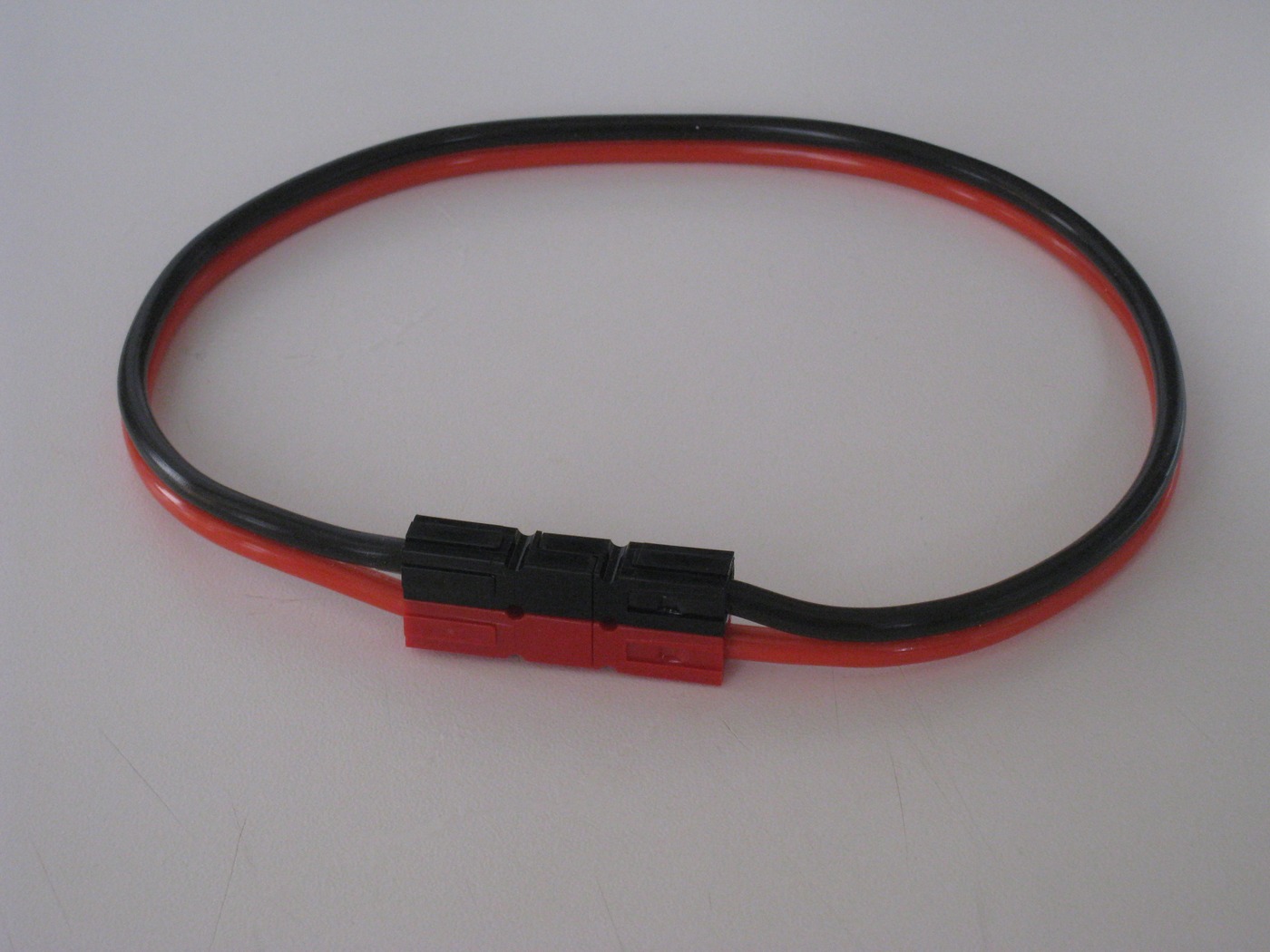
A 50 A label can make a battery plug look interchangeable. It does not. On a UPS, the connector is part of a battery circuit whose voltage, polarity, cable, breaker, and monitoring arrangement are chosen for a specific model. The same two-pole silhouette can hide different keying, pin geometry, wire termination, or sensing provisions. Schneider Electric says its Smart-UPS On-Line external battery packs use keyed mating connectors compatible only with their corresponding UPS; if a plug binds or needs excessive force, stop and verify the pairing. That is the right starting rule for any brand: identify the UPS and battery pack before shopping by colour or amp number.
What "50 A" tells you and what it does not
A 50 A rating describes a current limit under stated conditions; it is not a universal compatibility label. Connector makers rate a family with particular contacts, conductor sizes, ambient conditions, and use. Anderson Power Products' SB50 page, for example, lists two positions, wire sizes from #16 to #6 AWG depending on contact, and says the housing can use wire, PCB, or busbar contacts. It also distinguishes a UL hot-plug rating up to 50 A from higher current ratings under appropriate conditions. Those numbers belong to that product family and its specified contacts. They cannot be transferred to a visually similar generic plug or to the UPS itself.
Begin with the UPS nameplate and manual
Record the full UPS model, voltage class, and external-battery model if one is installed. Read the manual section for "external battery," "battery pack," or "battery cable." Find whether the maker specifies a proprietary cable kit or a user-replaceable connector. Some UPS manuals give the connector rating and replacement conditions; others explicitly require an approved battery module. For instance, the Tripp Lite SMART5000RT3U manual says a trained technician may replace its plug with a user-supplied 50-amp plug. This is a model-specific permission, not a general instruction for UPS owners. Where the manual names a cable part number, start there. A generic connector should not displace a named accessory without written confirmation from the manufacturer or a qualified service provider.
Compare the mating face, not just the listing photo
With equipment isolated and handled under the manual's procedure, photograph the UPS-side receptacle and the removed connector straight-on. Compare the number of power contacts, their shape and spacing, housing width and depth, latch or retaining feature, orientation, and any keyway. A two-position plug is not automatically a match for every two-position receptacle. Colour can help identify a keyed family in some systems, but it is not a substitute for the model compatibility table: colours can differ by maker, product family, voltage convention, and market. Never file a key, shave a rib, or force a plug into a port to make it fit. A forced connection can damage contacts or defeat a mechanical barrier intended to prevent an incorrect battery connection.
Check polarity and every contact function
Confirm positive and negative from the UPS documentation or an approved wiring diagram. Do not infer polarity from wire colour alone: red and black are common conventions, but field repairs, imported assemblies, and custom harnesses can depart from them. Some battery interfaces carry only positive and negative; others include protective earth, temperature, battery-identification, or pack-presence contacts. Count and identify every contact before selecting a replacement. If the manual does not show the pinout, do not energise a guessed assembly. APC's compatibility guidance makes clear that external packs are selected by model and keyed connector, rather than by plug appearance alone. The buyer's check is the whole circuit map, not "two pins looks right."
Match the cable and termination as a system
The connector body cannot compensate for an undersized or unsuitable cable. Confirm conductor cross-section or AWG, insulation temperature and voltage ratings, cable length, bend radius, strain relief, and terminal method against the UPS or battery-pack specification. Anderson's SB50 family illustrates why this matters: the same housing family accepts different contacts for different wire sizes, and contact choice affects electrical performance. If the UPS manufacturer specifies a cross-section, use that exact requirement; do not size the wire from a connector's marketing headline. A longer lead also adds resistance and voltage drop. Any change in cable length or routing should be reviewed against the manufacturer's cable assembly, especially on high-voltage battery strings.
A buying worksheet
Before asking for a quote, assemble a one-page compatibility record:
- Exact UPS model and region.
- Battery-pack model and nominal DC voltage.
- Manufacturer cable or connector part number.
- Clear photographs with a ruler beside, not inside, the connector.
- Mating-face dimensions and keyway.
- Pin count, polarity, and function of each pin.
- Cable gauge, length, and termination.
- Breaker or fuse specification.
- Whether the manual authorises field replacement and who will install it.
Ask the seller to confirm the exact shipped variant against this information and provide a dimensioned drawing, contact specification, and material and ratings document. A marketplace title or badge is not a substitute for those records.
When a generic 50 A connector may be reasonable
A generic connector is worth evaluating only when the UPS manual allows a user-supplied connector or a qualified service provider has approved the repair, and when the seller can document the exact mating geometry and electrical specification. Then compare the actual model, not broad phrases such as "Anderson style," "UPS compatible," or "50A." Ask for a mating sample or a controlled fit check before production quantity. Check that the opposite half is from a compatible keyed family, that contacts suit the installed cable, and that the connection has the correct retention and strain relief. Do not treat "same colour," "same number of pins," or a seller's statement that it is a replacement as sufficient proof.
How to screen an online listing
A useful listing identifies a maker or traceable model, not just a shape. It should state the contact arrangement, nominal voltage and current with rating conditions, supported conductor range, contact material and plating, housing material, operating temperature, mating-cycle basis, and applicable approvals. Ask which certificate applies to the exact model and who issued it; do not accept an unrelated company certificate as evidence for the part. Make sure price tiers refer to the same configured connector and that "50 A" is not simply a family name. For cable assemblies, request conductor construction, gauge, finished length, lug size, polarity drawing, and any fuse or breaker details. If several important fields are "customisable" but no current drawing is available, keep the item at inquiry stage.
Why a connector that fits may still be unsafe
Battery packs can deliver very high short-circuit current. Schneider Electric's Easy UPS 3M procedure warns of electric shock, explosion, or arc flash and requires battery-breaker isolation, insulated-handle tools, and qualified personnel for battery service. Those instructions apply to that equipment, and the relevant UPS manual governs other models. A connector change is not an appropriate live troubleshooting experiment. Do not unplug an external battery while the UPS is operating unless the model's documentation explicitly permits that operation. Do not measure, crimp, solder, or bridge exposed battery conductors without approved procedures and training. If the connector is hot, discoloured, loose, cracked, or arcing, take the UPS out of service according to its manual and contact a qualified technician.
Acceptance checks after an approved replacement
A qualified installer should verify the assembly against the approved drawing before energising: connector keying and retention; correct polarity and pin assignment; cable and contact size; secure crimp or specified termination; insulation and strain relief; protective earth or signal contacts if present; and the correct fuse or breaker. The pack voltage and allowed battery configuration must match the UPS manual. The initial connection should follow the manufacturer's sequence, including any breaker position and ground-first instruction. After the UPS recognises the pack, check its display or management software for battery status and alarms, then run only the manufacturer-approved self-test. A connector's ability to latch is a mechanical check, not proof that the battery voltage, polarity, or capacity is acceptable.
Equipvia may earn a commission from qualifying purchases through this link. The link resolved to Product ID 60812788339 during review. CPS resolution does not verify the seller's technical claims, the connector's rating, affiliate eligibility, or commission attribution. Check the actual selected variant and current terms before ordering.
This listing is included because it is the closest match found for the search, not because it has been qualified. Its page contains internally inconsistent claims about different 50 A, 75 A and 100 A versions, standards, temperature ranges and certifications, and it publishes no dimensioned drawing, contact part number or supplier qualification. Do not order it for a UPS battery path until the seller supplies the exact drawing, rating conditions, certificate scope and a sample that matches your UPS model. If those cannot be produced, buy the model-specific cable or pack instead.
Can I identify the plug from a photo online?
A photo can help locate a connector family, but perspective hides the dimensions that distinguish look-alike parts. If you are asking a supplier to identify it, send the UPS model label, battery-pack label, straight-on photos of both mating halves, a side profile showing the latch, and measurements of the housing and contact centres. Keep a scale outside the connector; do not insert metal rulers, calipers, or probes into energised contacts. If no label or manual is available, an authorised service provider may be able to identify the assembly from the model and serial number. A visual match is a lead to investigate, not authorisation to connect an unknown battery.
Three common errors in connector listings
First, "50A" is sometimes used as a headline for a product family even when the included contacts, wire range, or test conditions are not shown. Second, "600V" describes a voltage rating claim; it does not establish a particular UPS voltage, fault-current suitability, or a valid certification. Third, a seller may show several housing colours or amp sizes in one listing while the selected SKU is only one variant. Before checkout, require a written SKU-level confirmation and invoice description that names the exact housing, contact, wire range, and quantity. Save the page and drawing with the order record. If the supplier changes the selected variant after inquiry, repeat the compatibility check instead of assuming the replacement is equivalent.
Separate connector identity from UPS compatibility
There are two distinct questions: "What family of connector is this?" and "May this connector be used on this UPS?" A moulded brand or family code can answer the first question. The UPS manual, battery-pack compatibility table, or written manufacturer approval answers the second. A community post may correctly identify a connector and still not establish the voltage, polarity, or signal arrangement of another unit. APC publishes a specific UPS-to-XLBP compatibility table and cautions against forcing a keyed connector. Use enthusiast threads to learn what markings to photograph and what terms to search; do not treat a successful modification reported by one owner as a safe fit for a different model.
Quick answers
Can I replace a 50 A plug with a 175 A plug?
Not on the rating number alone. The larger body may not mate, and the cable, contacts, breaker, and UPS interface still have to be approved.
Do colours tell me the battery voltage?
Sometimes a manufacturer uses colour keying, but there is no safe universal colour chart for every UPS connector. Consult the exact manual.
Is a two-pin connector enough?
Only if the model's pinout shows two power contacts and no additional sensing or grounding function.
Can I use an "Anderson compatible" plug?
Only after confirming the specific family, colour and keying, dimensions, contacts, and electrical rating. If the maker sells a replacement cable or battery pack for the exact UPS, that is usually the lowest-uncertainty route.
A purchase decision in one sentence
Choose a 50 A UPS battery connector only after the exact UPS and pack documentation identifies a replaceable connector, the physical key and pinout match, the contacts and cable meet the specified current path, and a qualified person approves installation. If one of those checks is missing, buy the model-specific cable or pack, or pause for manufacturer confirmation. A familiar shape is a useful clue; it is not a compatibility test.
Share this article